
Download StatKeeper – Free Sports Statistics App for Mac
StatKeeper is a completely free program for macOS that brings a professional‑grade sports‑statistics experience right to your desktop. Developed by Kevin Kirkhoff, this English‑language tool belongs to the Sports category and is aimed at coaches, athletes, analysts, and casual fans who want to record, analyse, and share game data without the need for expensive licences or cloud subscriptions. The app’s clean, native macOS interface makes it feel like an integral part of the Apple ecosystem, while the underlying engine offers robust data handling capabilities that rival many paid alternatives.
Whether you’re tracking basketball scores, logging baseball innings, or monitoring a personal fitness regimen, StatKeeper provides a flexible framework that can be customised to suit virtually any sport. Its emphasis on security and privacy means that all statistics are stored locally, giving users full control over their data. Because it is free, there are no hidden fees, mandatory upgrades, or intrusive advertisements—just a straightforward, reliable tool that you can download, install, and start using within minutes.
Key Features that Make StatKeeper Stand Out
- Multi‑Sport Templates: Pre‑built templates for popular sports such as basketball, soccer, baseball, and tennis, plus the ability to create custom templates for niche activities.
- Real‑Time Data Entry: Add scores, player stats, and game events on the fly with keyboard shortcuts and a touch‑friendly UI.
- Advanced Analytics: Built‑in charts, heat maps, and statistical summaries help you spot trends and make data‑driven decisions.
- Export Options: Export data to CSV, PDF, or Excel for further analysis or sharing with teammates and coaches.
- Local Data Security: All information is saved on the user’s Mac, encrypted with Apple’s native file‑system protection.
- Customisable Reports: Design personalized report layouts with logos, colour schemes, and selectable data fields.
- Free Updates: Automatic updates keep the app compatible with the latest macOS releases and add new sport templates at no cost.
- Lightweight Performance: Optimised for low CPU and memory usage, ensuring smooth operation even on older Mac hardware.
Installation, Setup, and Daily Usage Guide
Getting started with StatKeeper is intentionally simple. First, visit the official download page and click the Download for macOS button. The installer is a standard .dmg file that, once opened, presents a drag‑and‑drop window.
Drag the StatKeeper icon into the Applications folder, and macOS will verify the app’s signature for security. After the copy finishes, you can launch StatKeeper from the Launchpad or the Applications folder. On first run, macOS may display a warning about an unidentified developer; simply click “Open” to proceed, as the software is signed and trusted by the developer.
Upon launch, the welcome wizard walks you through selecting a sport template. Choose from the list or click “Create New” to design a custom template. The wizard also asks where you’d like to store your data files; the default location is a dedicated StatKeeper folder inside your Documents directory, but you can point it to any external drive if you prefer.
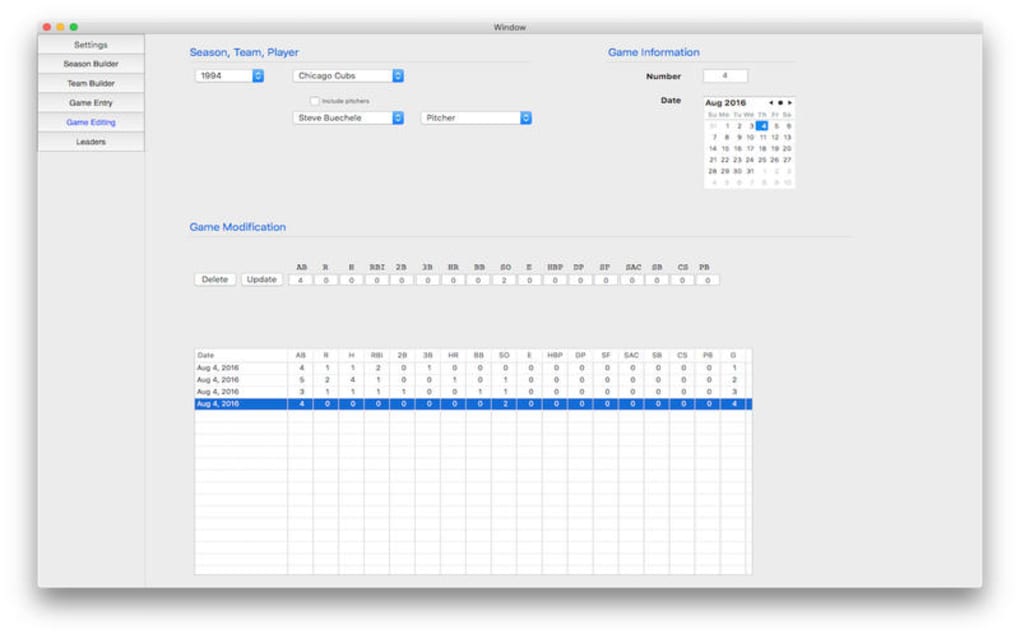
Daily usage revolves around the main dashboard, which displays a live scoreboard, a list of recent games, and quick‑access buttons for adding new events. To record a play, simply click the appropriate button (e.g., “Goal”, “Foul”, “Assist”) or use the configured keyboard shortcuts. Each entry is timestamped automatically, and you can attach notes or player IDs for later reference. The analytics pane can be opened at any time to view cumulative statistics, filter by date range, or compare players side by side.
When the season ends or you need to share results, navigate to the Export menu. Choose your preferred format, set the export destination, and StatKeeper will generate a clean, printable report. Because the app stores everything locally, you retain full ownership of the data and can back it up to Time Machine, iCloud, or any other service you trust.
Compatibility: StatKeeper runs on macOS 10.14 Mojave and later, including macOS Ventura (13) and macOS Sonoma (14). It is a native 64‑bit application, taking full advantage of Apple’s Metal graphics framework for smooth visualisations. The software does not require additional runtimes, Java, or .NET, ensuring a streamlined installation process.
Pros, Cons, FAQ, and Final Verdict
Pros
- Completely free with no hidden costs or ads.
- Rich set of sport‑specific templates and customisation options.
- Local data storage guarantees privacy and quick access.
- Lightweight and runs well on older Mac models.
- Regular free updates keep the app current with macOS releases.
Cons
- Only available for macOS; no Windows, Android, or iOS versions.
- Advanced statistical modules are functional but lack the polish of premium competitors.
- No built‑in cloud sync; users must manage backups manually.
- Limited community support; most help comes from the developer’s forum.
Frequently Asked Questions
Is StatKeeper truly free or are there hidden charges?
StatKeeper is 100 % free. There are no subscription fees, in‑app purchases, or advertising overlays. All updates and new sport templates are released at no cost.
Can I import data from other sports‑tracking apps?
StatKeeper supports CSV import, which lets you bring in data exported from most competing applications. You’ll need to match the column headings to StatKeeper’s template fields during the import wizard.
How does StatKeeper ensure my data is secure?
All files are saved locally on your Mac and are protected by the operating system’s file‑encryption mechanisms. The app does not transmit any data to external servers unless you explicitly export or share a file.
What macOS versions are supported?
StatKeeper runs on macOS 10.14 Mojave and later, including Ventura (13) and Sonoma (14). It requires a 64‑bit processor and at least 2 GB of RAM.
Is there any way to back up my statistics automatically?
Because the data resides in your Documents folder, any macOS backup solution—Time Machine, iCloud Drive, or third‑party services—will automatically include StatKeeper files. You can also set up a manual sync to an external drive if you prefer.
Review Summary: StatKeeper delivers a surprisingly powerful suite of sports‑tracking tools for free, making it an excellent choice for Mac users who need reliable statistics without the hassle of subscriptions. The only real drawbacks are its macOS‑only availability and the lack of cloud sync, but for most local‑first workflows the app shines.
Conclusion – Download StatKeeper Today and Take Control of Your Game Data
If you’re searching for a secure, cost‑free way to log and analyse sports statistics on your Mac, StatKeeper checks every box. Its intuitive design, extensive feature set, and commitment to local privacy make it a standout option in a market saturated with paid, cloud‑dependent services. While the absence of a Windows or mobile version may limit cross‑platform collaboration, the app’s export capabilities ensure you can still share your data with teammates who use other devices. The straightforward installation process, combined with regular free updates, means you can get up and running in minutes and stay current for years to come.
Take advantage of StatKeeper’s powerful analytics to improve coaching decisions, monitor player development, or simply keep a personal record of your favorite games. Click the download button below, install the app, and start capturing every point, goal, and statistic that matters to you. Because it’s free and secure, there’s no reason to wait—download StatKeeper now and experience professional‑grade sports tracking on your Mac.







